

Global Exchange Rates delivers the official exchange rates published by central banks and tax authorities into SAP automatically, every day, across S/4HANA Cloud, S/4HANA on-premise, and ECC.
The rates arrive through SAP Integration Suite and update on a schedule, with no manual maintenance. It is built for finance teams that need official rates for accounting, VAT, and reporting.
Why official exchange rates in SAP?
Many tax authorities and auditors expect statutory documents, VAT declarations, and customs filings to use the officially published exchange rate rather than a market estimate. Keeping those rates current in SAP usually means manual entry in transaction OB08, spreadsheet uploads, or custom feeds built against individual central banks. Global Exchange Rates replaces all of that with one integration package for SAP Integration Suite.
One package, every SAP edition
The Global Exchange Rates for SAP package contains two ready-made integration flows. Import it into SAP Integration Suite and deploy the one that matches your landscape.
SAP S/4HANA Cloud (Public Edition). Rates flow through SAP’s own Market Rates Management, Bring Your Own Rates service, the sanctioned channel for automated rate updates in Public Cloud. Configure your API key and MRM connection, and official rates appear automatically in the Currency Exchange Rates app every day.
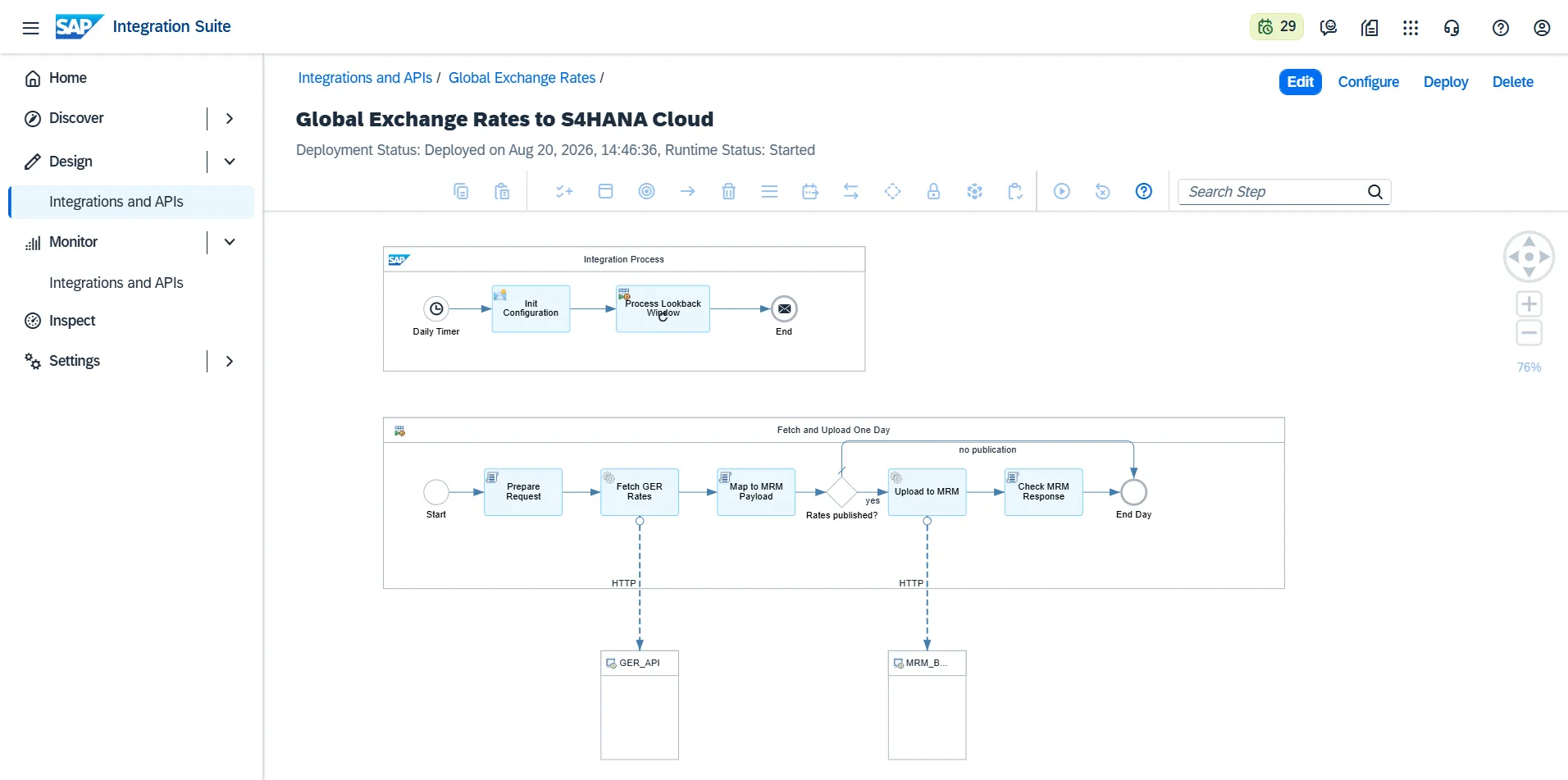
SAP ECC and S/4HANA on-premise or Private Cloud. Rates are posted as standard EXCHANGE_RATE01 IDocs through SAP Cloud Connector and booked automatically by SAP’s standard mechanism into your exchange rate table (TCURR). Nothing is installed inside your SAP system; a one-time partner profile is the entire SAP-side setup.
Easy setup
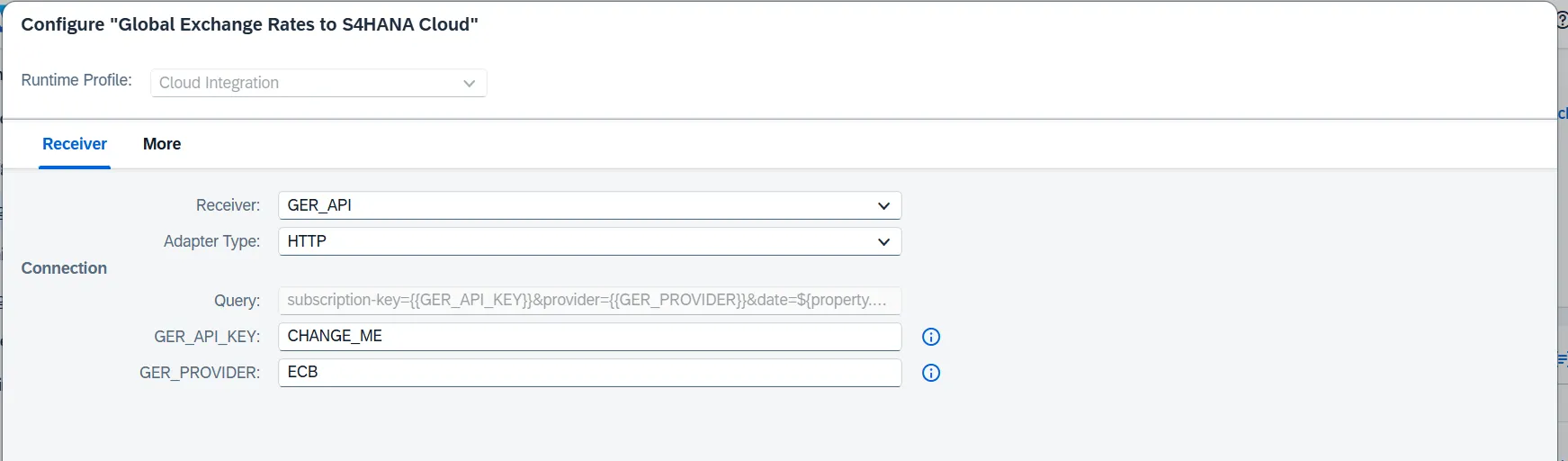
Both flows are configured, without the need for custom coding. A single configuration dialog holds every setting: your API key, the rate provider, the update schedule, the historical lookback window, and the connection details for your landscape.
Official central banks rate publishing
- Official sources worldwide from central banks and tax authorities, many with no other automated feed into SAP.
- One subscription, every source and every company. Assign different central banks to different companies or rate types by deploying configured copies of the same flow.
- Publication-aware scheduling. Sources that publish weekly or with gaps are handled with a configurable lookback window, so days without publication complete cleanly instead of raising false alarms.
- Historical backfill built in. Load months or years of history for a new implementation with a single configuration value, safely re-runnable.
- Rates exactly as published. Each rate is delivered in the source’s own base currency with its true publication date; nothing is interpolated or substituted.
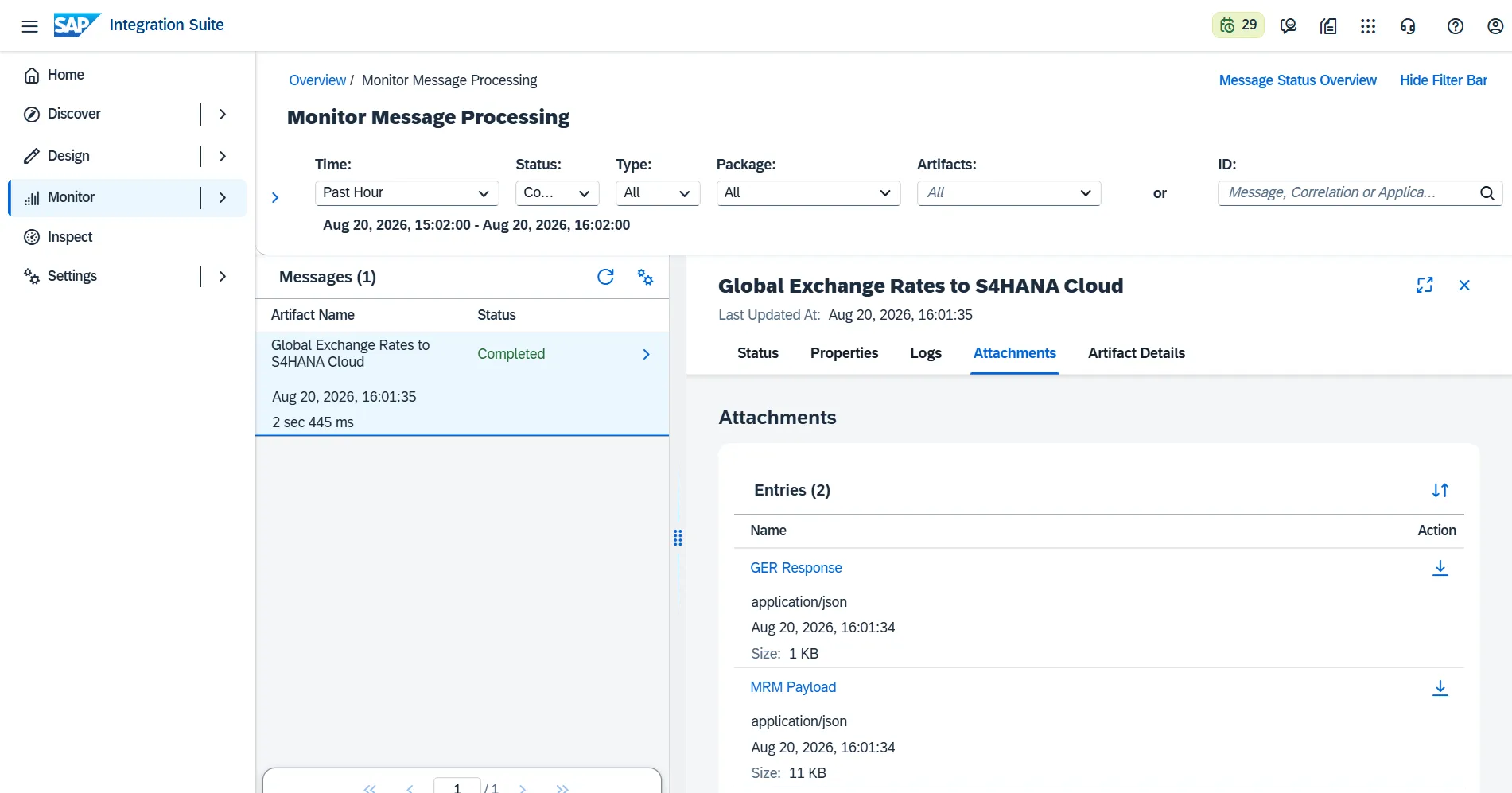
- Transparent operation. Every run is visible in SAP Integration Suite monitoring, with the fetched rates and the delivered payload attached to each message, and failures surfaced through your tenant’s standard alerting.
Prerequisites
This integration package runs on SAP Integration Suite, which is required. Integration Suite is SAP’s standard cloud middleware. If you are unsure whether you have it, your SAP administrator or account team can confirm in minutes.
- SAP Integration Suite (required).
- For S/4HANA Cloud: the SAP Market Rates Management, Bring Your Own Rates service.
- For ECC or on-premise: SAP Cloud Connector.
- A Global Exchange Rates subscription. You can start a free trial.
The integration is provided as a package (.zip) that you import into SAP Integration Suite, then deploy the flow that matches your environment. The file may need to be unlocked after downloading. Connect it with your Global Exchange Rates API key; if you do not have one yet, you can start a free trial.
Downloads
| Download | Version | Date |
|---|---|---|
| Global-Exchange-Rates_v1.0.0 Download | 1.0.0 | 20/08/2026 |
Documentation
The complete documentation on configuring and using the integration is available at the following link: https://sap-docs.globalexchangerates.org/en-US/apps/GlobalExchangeRates/intro.html
Get started
The SAP integration is available on the Enterprise plan. Install the integration package, or contact us via the contact form.
Global Exchange Rates also offers native connectors for Dynamics 365 Finance & Operations, Business Central, QuickBooks, and Salesforce. Explore the full list of supported central banks and tax authorities.
Frequently asked questions
Does this work with S/4HANA Public Cloud?
Yes, it is built for it. Public Cloud allows no direct rate uploads; this integration feeds SAP’s Market Rates Management service, the official automated channel.
How do I update exchange rates automatically in S/4HANA Cloud?
Deploy the S/4HANA Cloud flow, which feeds SAP’s Market Rates Management service on a schedule. Official rates then load into the Currency Exchange Rates app automatically, with no manual entry.
How do I automate exchange rate (TCURR) updates in SAP ECC?
The ECC and on-premise flow posts official rates as standard EXCHANGE_RATE01 IDocs, which SAP books into the exchange rate table (TCURR) automatically. Configure the schedule once and the updates run on their own, replacing manual OB08 entry.
Do I need to install anything in my SAP system?
No. Both flows run in SAP Integration Suite. The on-premise variant uses SAP’s standard IDoc mechanism, configured rather than programmed on the SAP side.
Which rate sources are supported?
All Global Exchange Rates providers: central banks and tax authorities worldwide. See the coverage page.
Can different companies use different central banks?
Yes. Deploy one configured copy of the flow per source; one subscription covers them all.
How do I load historical rates?
Set the lookback configuration to the number of days you need and run once. The flow loads day by day and can be safely re-run.
Previous versions
| Download | Version | Date |
|---|